Mesh Refinement
Discretization error
The finite-element solution is only an approximation. The mesh limits its accuracy: the basis functions can represent the true field only as well as the element size and order allow. Uniform refinement everywhere reduces the error but is expensive, because most of the extra degrees of freedom land where the field is already well resolved. Adaptive refinement instead concentrates resolution where it does the most good.
Error indicators
Adaptivity needs a way to tell, without knowing the exact answer, where the mesh is too coarse. Each model can supply a per-element error indicator: a scalar, computed from the current solution, that estimates how much each element contributes to the overall discretization error. Elements with a large indicator are the ones worth refining.
The indicator comes from the computed solution rather than a known reference. So it is an a posteriori estimate. Refinement is a loop: solve, estimate, refine, and solve again.
Refinement modes
mufem drives refinement through a dedicated refinement model, which supports two modes:
- Uniform refinement subdivides every element of the mesh. It is simple and predictable, useful for convergence studies.
-
Adaptive refinement asks the participating models which elements to act on. A model can flag elements for
- h-refinement, subdividing the flagged elements into smaller ones,
- p- (order) refinement, raising the polynomial order of the basis on the flagged elements, or
- r-refinement, relocating mesh nodes to concentrate resolution without changing their number or order (planned, not yet supported).
Refining in \(h\) adds elements where the field varies rapidly. Refining in \(p\) adds accuracy where the field is smooth. Refining in \(r\) moves existing resolution to where it is needed.
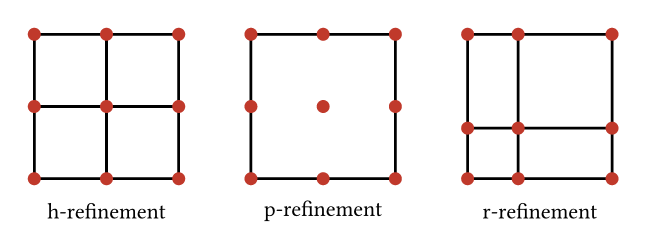
See the Refinement Model for how to enable and configure refinement in a case.
Hanging nodes
When you enable non-conforming mesh support, local h-refinement leaves the mesh non-conforming. A refined element meets a coarser neighbour along an edge or face whose endpoints do not all match. This edge or face carries hanging nodes. The degrees of freedom at those nodes cannot be free, or the field would be discontinuous across the interface.
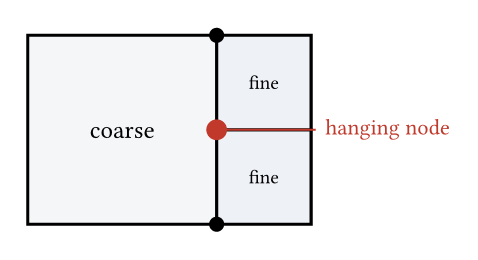
mufem handles them exactly as the multi-point constraints in Constraints: the projection \(P\) ties each hanging degree of freedom to its parent edge or face, so the refined solution stays continuous. So adaptive refinement and the constraint machinery are two sides of the same feature.